


Bible Note Taker & Recorder
4.676.00 Reviews
App Specs
- Version
- 1.6.1
- Updated On
- License
- Free
- Downloads
- 500,000+
- Developer
- Note AI Pte. Ltd.
- Categories
- Books & Reference
- Platform
- Android
Screenshots



 Analysis by AppCompare
Have you ever wished for an app that seamlessly combines note-taking with audio recording, all while diving deep into your favorite Bible passages? Well, say hello to Bible Note Taker & Recorder. This app is like having a personal assistant right in your pocket, ready to capture your spiritual reflections and sermon notes with ease.
Getting Started with Bible Note Taker & Recorder
First things first, downloading Bible Note Taker & Recorder is a breeze. Available for both Android and iOS, you can grab it from your respective app store. Once installed, you're greeted with a clean and intuitive interface that feels like it was designed just for you. The onboarding process is straightforward, guiding you through the main features without any fuss.
Features that Stand Out
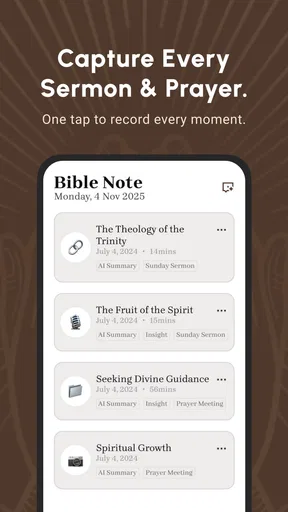
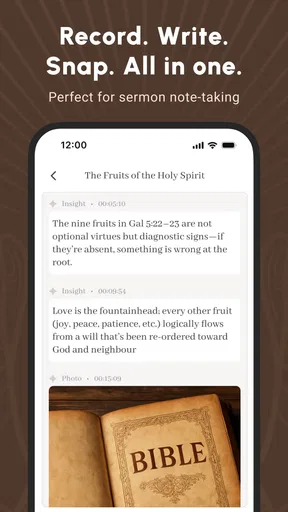
Let’s dive into what makes this app a must-have for anyone looking to enhance their Bible study sessions. At its core, the app allows you to take notes while reading the Bible. You can jot down personal reflections, sermon highlights, or even questions you’d like to explore further. The note-taking feature is robust, with options for categorizing and tagging notes, making it super easy to find them later.
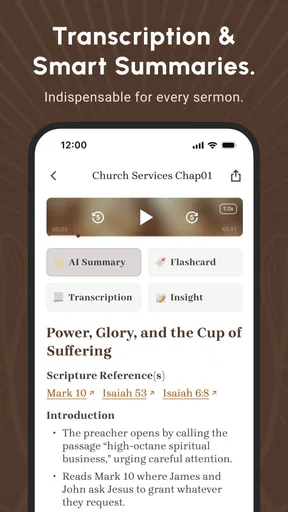
But where this app really shines is in its audio recording functionality. Imagine this: you’re in church, and the pastor is delivering a powerful sermon. Instead of scrambling to write everything down, you can simply hit the record button. The app allows you to record high-quality audio, so you can revisit those key moments anytime. Plus, you can even attach these recordings to specific Bible passages or notes for easy reference.
Integration and Usability
The integration with various Bible versions is another highlight. You can choose from numerous translations, making it easier to follow along in the version you’re most comfortable with. The app also supports syncing across devices, so your notes and recordings are always up to date, whether you’re on your phone or tablet.
Another neat feature is the search functionality. You can quickly find specific notes or recordings by typing in keywords, which is a huge time-saver when you’re trying to locate that one profound thought you had last month.
Personal Experience and Opinion
Personally, I found the app to be a game-changer. As someone who loves to reflect on sermons and Bible passages, having a dedicated space to store my thoughts and audio recordings is invaluable. The interface is sleek and user-friendly, making it a joy to use during my quiet time or Bible study group sessions.
Worth Reading Before You Choose

EA SPORTS FC Mobile 26 Is a Bigger Football Game, but It Takes Time

Flipboard Shows What News Apps Must Do Beyond the Feed

Switching to Android Auto Means Rethinking Your Driving Routine

Google Calendar Makes a Crowded Week Easier to Manage

Ludo King Makes the Most of the Minutes Between Plans

Baby Panda World Brings Quick Play to Modern Phones, but Its Game Library Feels Busy
One of the things I appreciate most is the ability to organize my notes and recordings by themes or Bible books. It’s like having a digital library of my spiritual journey, all neatly organized and easily accessible. Whether you’re a seasoned Bible scholar or just starting your journey, this app adapts to your needs.
Final Thoughts
In conclusion, Bible Note Taker & Recorder isn’t just an app; it’s a companion for your spiritual journey. It combines the practicality of note-taking with the richness of audio recording, all wrapped up in a user-friendly package. Whether you’re capturing a sermon, reflecting on a passage, or preparing for a Bible study, this app covers all bases. So, if you're looking for a way to enrich your Bible study experience, give this app a try. You might just find it becomes an indispensable part of your daily routine.
Pros
- Easy-to-use interface for quick note-taking.
- Audio recording feature for capturing sermons.
- Syncs across devices for seamless access.
- Customizable themes enhance user experience.
- Search function helps find notes swiftly.
Cons
- Limited free storage for recordings.
- No offline access for audio recordings.
- Ads can be intrusive in the free version.
- Lacks integration with other Bible apps.
- Some features require a premium upgrade.
FAQs for Bible Note Taker & Recorder
What features does Bible Note Taker & Recorder offer?
Bible Note Taker & Recorder provides a comprehensive suite of tools for users to record notes and audio directly linked to Bible verses. You can organize your thoughts with customizable tags, share insights with others, and access an extensive library of translations. The app also supports offline use, ensuring your study is uninterrupted.
Is Bible Note Taker & Recorder available offline?
Yes, Bible Note Taker & Recorder offers offline functionality. You can access your saved notes and recordings even without an internet connection. This feature is particularly useful for users who study in areas with limited connectivity or prefer to avoid distractions during their Bible study sessions.
How secure is my data in Bible Note Taker & Recorder?
The app prioritizes user privacy and data security by employing encryption for all saved notes and audio recordings. Additionally, users can set up password protection and biometric authentication to further safeguard their personal and sensitive information within the app.
Can I share my notes from Bible Note Taker & Recorder with others?
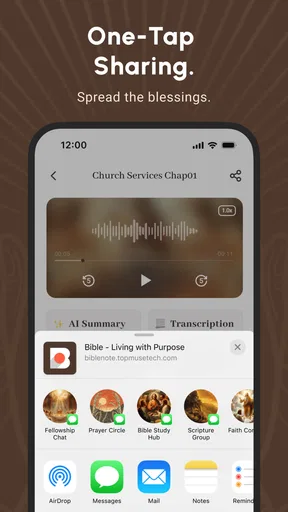
Yes, you can easily share your notes and recordings with friends or study groups. The app allows you to export your notes to various formats such as PDF or text, and you can also share them directly via email or social media platforms, making collaboration effortless.
Is Bible Note Taker & Recorder user-friendly for beginners?
Absolutely, the app is designed with a clean and intuitive interface, making it accessible for users of all experience levels. New users will find the setup process straightforward, with guided tutorials and responsive customer support available to assist with any questions or navigation issues.


